Save your self some time with this easy tool for Banquet Event Orders (BEOs) and Proposals
Building BEOs from scratch gets old. Fast. You’re pulling event details from emails, checking guest counts, updating menu notes, confirming room setup, and hoping every team member is looking at the same version before event day.
Our free BEO template gives you a cleaner starting point.
Simply fill out the form to receive a free editable banquet event order template you can customize for your venue and workflow.
Use it to create a more consistent BEO process, keep your team on the same page, and make last-minute adjustments easier to manage.
Get the Free BEO Template
Tired of rebuilding Banquet Event Orders (BEOs) from scratch every time a new event hits the calendar?
Fill out our free BEO form and get a template that gives your team a cleaner, faster way to organize the details that keep events moving.
Instead of starting with a blank document, your team gets a clear framework they can customize, share, and reuse across different event types.
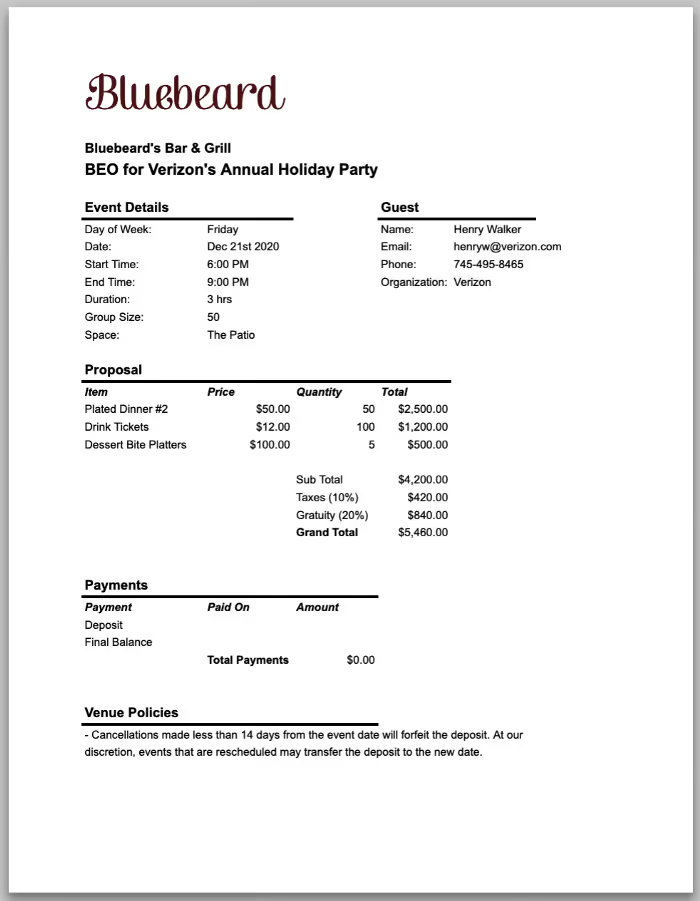
What’s Included in the Template?
Our free BEO template gives venues a standardized format for organizing the event details teams need before service starts. It's just a starting point, so you can customize the form around your venue, catering process, event types, and internal workflow.
The goal is simple: keep the necessary information in one comprehensive document so every team member can find what they need and stay on the same page.

Event Information Section
The event information section captures the basics of the event, including:
- Client name
- Event name
- Event date
- Venue space
- Guest count
- Event types
- Start time
- End time
- Location
These details might seem simple, but they shape almost everything that follows. Guest count affects staffing, food, setup time, service flow, and room needs. The event date, start time, end time, and location help each team member understand where they need to be and when.
For busy venues managing weddings, corporate events, and restaurant buyouts, this section keeps the basics easy to find instead of buried in emails.
Event Timeline and Schedule
The timeline section helps teams map out the flow of the event. It includes space for:
- Setup timing
- Floor plans
- Vendor arrivals
- Ceremony timing
- Service timing
- Room flips
- Breakdown schedule
A strong schedule keeps the venue, catering team, event planner, and vendors working from the same plan. It also helps teams spot timing issues before they become last-minute adjustments.
When the timeline is clear, your team can prepare the room and manage transitions with fewer surprises.
Food and Beverage Tracking
Food and beverage details can make or break the guest experience, especially when dietary restrictions or allergies are involved.
This section includes space for:
- Menu planning
- Beverage packages
- Dietary notes
- Catering services
- Service instructions
- Special requests
Keeping these details in one place lets the back of house (BOH) and event manager double-check what the client requested before the event begins. It also makes it easier to track special meals, allergy notes, service timing, and menu changes tied to the event.
Missing a dietary restriction or allergy note is not just a service issue. It can create serious health risks for guests and potentially expose venues to liability issues or legal trouble.
A well-organized banquet event order helps teams confirm that everyone handling food, from the kitchen to servers, has access to the same accurate information.

Room Setup and Logistics
This section helps teams organize how the room should look, function, and flow. It includes:
- Seating arrangements
- Room setup instructions
- Floor plan notes
- AV requests
- Tables
- Setup instructions
Room setup details give staff a clear picture of what needs to happen before guests arrive. They can see where tables go, what the setup should include, whether AV is needed, and how the space should support the event.
For weddings, corporate events, and larger events, clear setup notes help reduce common mistakes and support more seamless event execution.
Financial Tracking
Financial tracking helps venues keep important payment details connected to the event order. The template includes space for:
- Deposits
- Outstanding balances
- Event totals
- Payment notes
- Service charges
This section helps the business side of the event stay organized without mixing up payment notes, balances, and event totals across different documents.
Internal Notes and Vendor Information
Internal notes often end up scattered across emails, texts, or side conversations. This section gives teams one place to capture the details that do not always fit neatly elsewhere.
It includes space for:
- Vendor contacts
- Staffing notes
- Operational reminders
- Special requests
- Customer notes
- Team communication
Use this section for anything your team needs to remember before, during, or after the event. That might include vendor arrival details, staffing reminders, a client preference, a sign placement note, or a special request that matters to the guest experience.
When everyone can find those details quickly, communication gets easier, and the whole event feels more well-organized.

How to Use the Template
The template is designed to be simple enough for venues starting out, while still flexible enough to support more detailed event workflows.
Download and Customize the Template
Fill in the form on our free BEO template page and download the template.
From there, you can:
- Add your venue branding
- Include your logo and contact information
- Customize sections based on your workflow
- Adjust layouts for different event types
- Add fields specific to your business
The template serves as a starting point, helping you organize details more consistently without rebuilding the same form every time.
Fill in Event Information Manually
Next, fill in the details for the specific event. This usually includes:
- Guest count
- Timelines
- Menu selections
- Vendor details
- Room setup instructions
- Food and beverage information
- Payment tracking
- Special requests
Once completed, the document can be exported as a printable PDF or shared digitally with internal teams or clients.
For venues managing events manually, this process often involves:
- Copy-pasting details between documents
- Updating multiple versions
- Coordinating information across spreadsheets, emails, and PDFs
- Manually correcting changes across several files
That works for many venues early on, but it can become difficult to manage as event volume grows.
Keep Teams Aligned With Shared Documents
Once finalized, the BEO can be shared with:
- Kitchen staff
- Front-of-house teams
- Vendors
- Coordinators
- Catering teams
- Event planners
Using one comprehensive document helps reduce communication gaps and keeps teams working from the same information.
As event volume increases, though, manual updates can become harder to track, especially when several departments need real-time access to changing event details.

Automate BEO Workflows With Perfect Venue
Templates are helpful, but manually updating BEOs can still eat up a huge amount of time.
One guest count changes, and suddenly someone has to update the timeline, catering notes, staffing requirements, and email threads. It’s easy for outdated information to slip through the cracks.
Perfect Venue helps eliminate that repetitive admin work by automatically generating and updating BEOs as event details change.
Instead of rebuilding documents by hand, our event management software helps you manage proposals, timelines, payments, and event documents in one centralized system.
That means:
- Pull BEOs together without starting from scratch
- Update event details once instead of chasing changes across files
- Keep kitchen, service, and management teams working from the latest plan
- Move faster with saved email templates and automated follow-ups
- Cut down on copy-pasting, duplicate work, and version confusion
- Keep proposals, payments, timelines, and event documents connected
- Spend more time creating great events and less time cleaning up admin messes
The free template is the perfect starting point. But as operations become busier and more complex, dedicated venue management software is what’ll truly get your business growing.
Conclusion
Standardized BEO workflows make it easier for teams to stay aligned and execute events smoothly, whether you’re managing weddings, catering services, corporate events, or private dining experiences.
But while templates are a great starting point, they can fall behind when operations grow.
Software can help your team scale event management more efficiently while reducing repetitive admin work behind the scenes.
Download the free BEO template to get started but don’t forget to explore how Perfect Venue can help your teams automate BEO workflows and manage events with less chaos. Start your free trial today!
Frequently Asked Questions
Is the Perfect Venue Banquet Event Order Template Free?
Yes. The template is completely free to download and customize for your venue or business.
Can I Customize the Perfect Venue BEO Template?
Absolutely. The template is editable, so venues can customize sections, branding, layouts, and fields based on their workflow and event planning process.
Can Restaurants and Hotels Use the Perfect Venue BEO Template?
Yes. The template is designed for restaurants, hotels, caterers, breweries, wedding venues, and other businesses managing events.
When Should Venues Switch to Venue Management Software?
Venues should switch to venue management software when templates, spreadsheets, and PDFs start slowing the team down instead of keeping events organized. A template works well when event volume is manageable. But once your team is juggling more inquiries, proposals, BEOs, payments, timelines, and last-minute changes, manual systems get messy fast.